- Published on
Introducing SimpleModule: A Modular Monolith Framework for Python, Built on FastAPI and Inertia
Series: SimpleModule
This post is part of the SimpleModule series.
Table of Contents
The problem
Most Python web apps I see go one of two ways. Either everything lives in one package and the boundaries blur within a year, or the team splits into services early and spends its time on API clients, contracts between services and deployments.
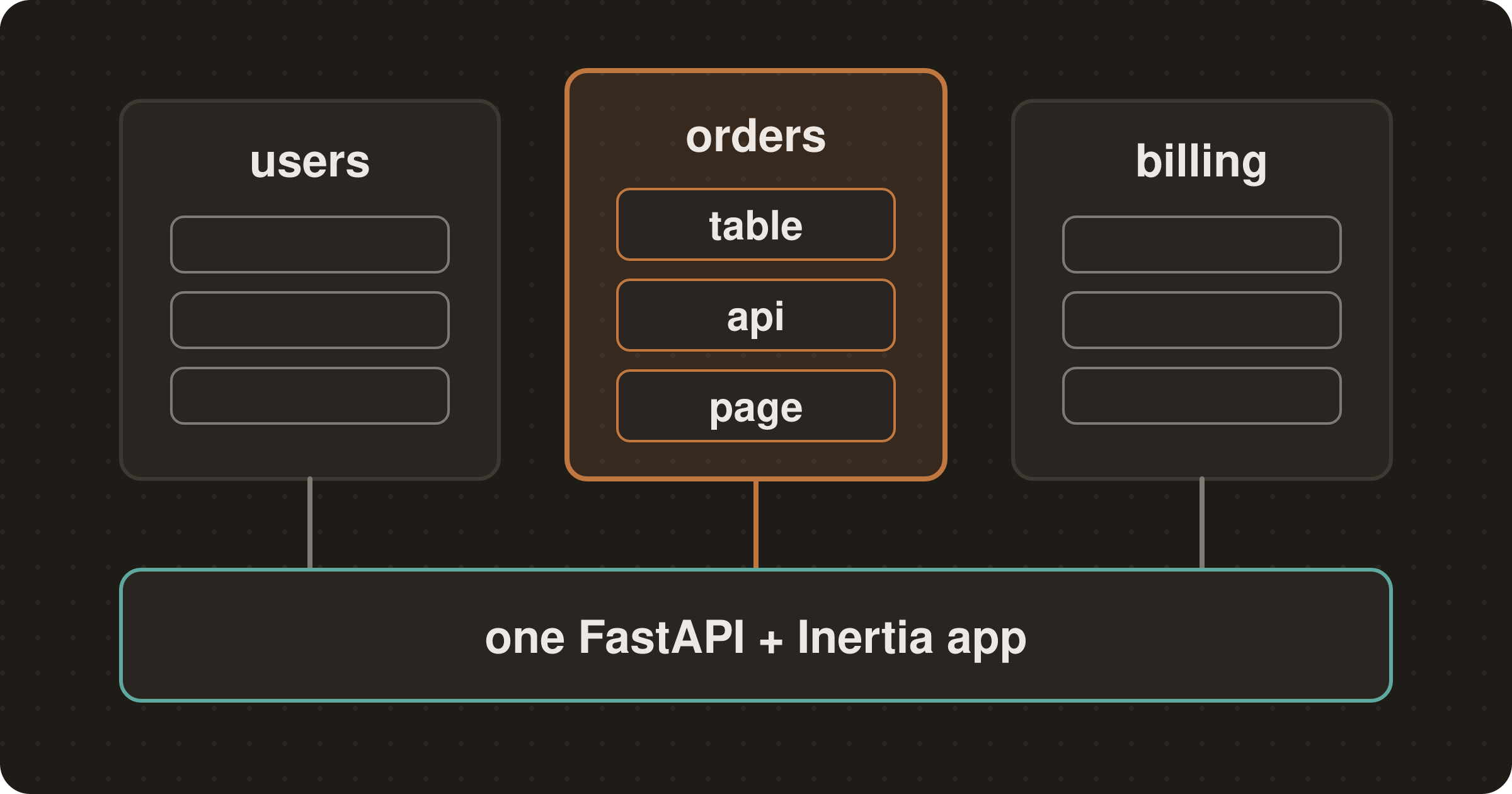
I wanted the middle: features that live in their own packages with their own data, but ship as one app with one process and one database. SimpleModule does that. It's a modular monolith framework for Python, built on FastAPI and Inertia, and I now use it for new apps.
The idea
The README puts it in one line:
Each feature lives in its own self-contained module — its own SQLModel tables, FastAPI endpoints, React pages — but everything ships as one FastAPI + Inertia.js + React app.
The stack:
- Backend: Python 3.12, FastAPI, SQLModel (async SQLAlchemy plus Pydantic) and Alembic.
- Frontend: Inertia.js, React and Tailwind CSS 4, served by Vite in development.
- Tooling: uv workspaces, Ruff, ty, Biome and pytest.
A module is a normal Python package. You can keep it in the app's repo or publish it to PyPI and install it like any other dependency. The host app finds it at boot.
How a module plugs in
A module declares itself through a Python entry point in its pyproject.toml. This is the site_lock module, which puts a shared password in front of a site:
[project.entry-points.simple_module]
site_lock = "site_lock.module:SiteLockModule"
The entry point names a class with a meta and some hooks (abridged from site_lock/module.py):
class SiteLockModule(ModuleBase):
    meta = ModuleMeta(
        name=c.MODULE_NAME,
        depends_on=[c.MODULE_AUTH],
        optional_depends_on=[c.MODULE_SETTINGS],
    )

    def register_settings(self, app: FastAPI) -> None:
        from site_lock.core.settings import SiteLockSettings
        from site_lock.core.state import SiteLockState

        preserve_across_sign_in(app, c.SESSION_KEY)
        register_module_settings(
            app, c.MODULE_PACKAGE, SiteLockSettings,
            lambda s: SiteLockState(settings=s),
        )

    def register_middleware(self, app: FastAPI) -> None:
        from site_lock.web.middleware import SiteLockMiddleware

        app.add_middleware(SiteLockMiddleware)
At startup the framework loads every entry point in the simple_module group. It sorts the modules by depends_on and calls their hooks in that order. There's nothing to register in the host: adding the package as a dependency is enough. Hooks cover routes, settings, menu items, permissions, feature flags, event handlers, middleware, health checks, rate limits, and startup and shutdown.
Outside development, discovery is strict. A broken entry point or a missing dependency stops the boot with an error instead of quietly skipping the module.
What a module owns
A feature module usually has three parts: a table, some endpoints and a page.
Tables. Each module gets its own SQLAlchemy MetaData, and table names are prefixed with the module name. The prefix is a convention the scaffold follows, not something the framework enforces. This is the model from the module template, shortened (the template also has a description and an is_active field, and takes the names from constants):
Base = create_module_base("orders")

class Order(Base, AuditMixin, table=True):
    __tablename__ = "orders_order"
    id: int | None = Field(default=None, primary_key=True)
    name: str = Field(max_length=200)
Endpoints. Plain FastAPI routers. The module adds an API router and a view router, and the template guards each /api route with a permission (abridged from the module template):
@router.get("/", response_model=list[ItemOut],
    dependencies=[Depends(RequiresPermission(PERM_X_VIEW))])
async def list_items(service: ItemService = Depends(get_item_service)) -> list[ItemOut]:
    return await service.get_all()
Pages. View routes render React pages through Inertia. The server passes props, and Inertia renders the matching component, with no separate API client to write (abridged from the module template):
async def browse(inertia: InertiaDep, service=Depends(get_item_service)) -> InertiaResponse:
    items = await service.get_all()
    return await inertia.render(PAGE_BROWSE, {"items": [i.model_dump(mode="json") for i in items]})
The page lives in the module's pages/ folder. Its prop types come from the module's OpenAPI schema, generated into api.generated.ts:
import type { components } from './api.generated';

type Item = components['schemas']['ItemOut'];

export default function Browse({ items }: { items: Item[] }) {
  // ...
}
In the framework repo, make gen-api-types regenerates these files and CI fails if the committed ones are stale.
How modules talk to each other
A module's public surface is its contracts/ package: DTOs and events. Other modules import from there and nowhere else. One rule is enforced by a diagnostic: framework packages can't import any module. Keeping one module out of another's internals is a convention for now, not a linter rule.
For cross-module reactions there's an in-process event bus. An Invoices module can listen for orders without the orders module knowing about it (from the framework's events guide):
class InvoicesModule(ModuleBase):
    meta = ModuleMeta(name="Invoices", depends_on=["Orders"])

    def register_event_handlers(self, bus: EventBus) -> None:
        bus.subscribe(OrderPlaced, self._on_order_placed)
publish is in-process only: no persistence and no retries. When a handler must run even if the process crashes, use publish_durable and subscribe_durable. They go through an outbox in the background_tasks module, which runs on Celery and Redis. That gets its own post later in this series.
What comes in the box
The framework repo ships 17 modules. The ones most apps start with:
authandusersfor sign-in with email and password, OAuth and OIDC.keycloakandoidcare the alternative providers, and you pick one.permissions,settingsandfeature_flags, each with an admin UI.tenants,audit_log,file_storage,mailandbackground_tasks.dashboard,branding,api_tokens,sharingandsite_lock.
Bigger features live in a separate repo, smpy_modules, and install from PyPI: a page builder, news, records, billing with Stripe, and images.
Catching mistakes with smpy doctor
Most of the framework's rules come with a diagnostic code, and smpy doctor (from the smpy CLI) reports them. Some examples:
- Missing page: an Inertia view names a page file that doesn't exist.
- Ungated route: an
/apiroute has no permission check. - Unmigrated table: a module table isn't covered by any migration.
- Database behind: the database is behind the latest migration. This one stops the app from booting in every environment.
Migrations live in the host's Alembic setup, not in the module packages. A module's first revision should set a branch label named after the module. In the framework repo, make migration LABEL=<label> msg="..." generates a revision on that branch. In an app made by smpy new, it is make migration msg="...".
Pitfalls
- It's early. Packages are at 0.0.44 and marked alpha. The changelog has behaviour changes between releases, so pin versions.
- A new module's sample table has no migration. The module scaffolder doesn't create one, and
smpy doctorflags it (SM011) until you generate one. - Check migrations before Postgres. Migrations generated against SQLite need a check before you run them on Postgres.
- Tenants share one database. Multi-tenancy isolates rows with a mixin, not separate databases. If you need a database per tenant, this isn't the framework for it.
Try it
You need Python 3.12 or later, uv and Node. Then:
uvx --from simple_module_cli smpy new my-app
cd my-app
make dev
smpy new asks for the database (SQLite by default), whether to enable multi-tenancy, and which modules you want. The default standard preset gives you users, dashboard and permissions, plus auth, which they depend on. It then installs the Python and JavaScript dependencies, creates an initial migration and applies it. make dev starts FastAPI on port 8000 and Vite next to it. With SQLite, nothing else has to run.
The docs are at docs.py.simplemodule.dev. In the next part I'll build a module from scratch: a table, an endpoint, a React page, a permission and a migration.