- Published on
When Parallel Coding Agents Crash Your Workstation
Table of Contents
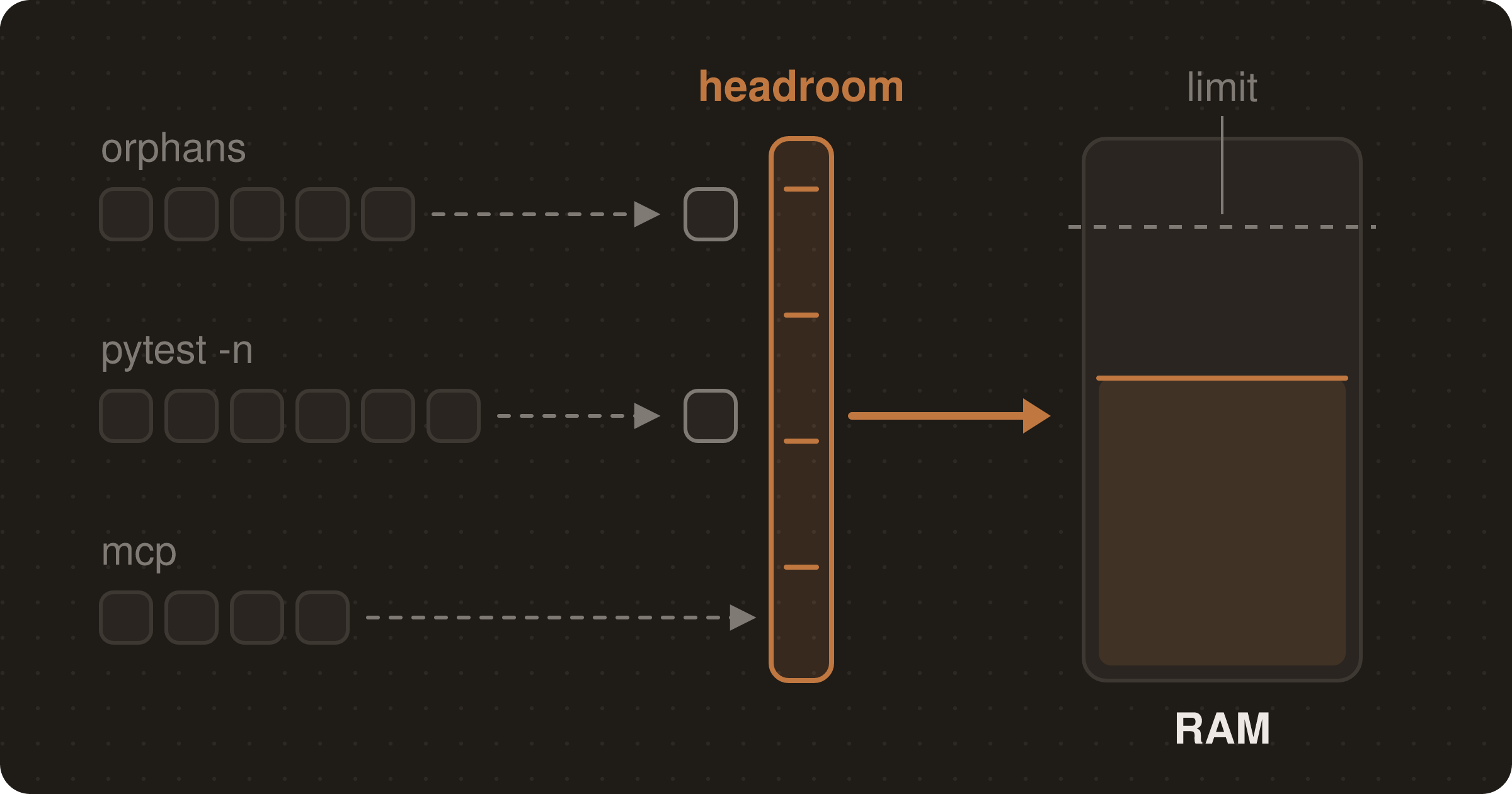
I run a lot of coding agents at once: ten or so Claude Code sessions in one terminal, plus Codex jobs and a background issue worker, on a workstation with 24 cores and 60 GiB of RAM. In under three weeks it crashed on two consecutive days, and two slower problems ate memory and broke the browser. None of the agents did anything wrong on its own. The problem was what they did together, and what they left behind.
Here's what ate the machine, how I found out, and the five guardrails that have kept it up since.
The crash: oomd killed the whole terminal
One evening every Claude session and the terminal multiplexer holding them vanished together. Nothing in the multiplexer's own log said why. The system journal did:
systemd-oomd: Killed .../app.slice/app-gnome-Alacritty-202331.scope
  due to memory pressure for user@1001.service being 56.28% > 50.00% for > 20s
  Current Memory Usage: 45.5G
  systemd-oomd killed 420 process(es) in this unit.
Two things to understand here:
- It killed a whole cgroup. GNOME starts each app in its own cgroup (a "scope"). The multiplexer, every pane, every agent and everything the agents started all inherited the terminal window's scope.
systemd-oomdkills the biggest cgroup as a unit, so 420 processes went at once. Any terminal would have died the same way. - 50% isn't "50% of RAM". It's memory pressure: the share of time processes spent stalled waiting for memory. At 56% the machine was already swapping hard.
The fix that made it worse
My first reaction was to switch off oomd's pressure kill for my user (ManagedOOMMemoryPressure=auto in a user@.service drop-in). The reasoning sounded fine: a machine running parallel work can be busy, and oomd kills everything in the scope, while the kernel's OOM killer only kills one process.
About an hour later the session crashed again, and it was worse. With oomd out of the way, RAM (60 GB) and swap (8 GB) filled completely. The kernel OOM killer then started picking processes: first a Chrome renderer, then my user's D-Bus. Losing D-Bus took the whole GNOME session down and logged me out.
So I put the default back. With oomd on, I lose the terminal. With it off, I lose the desktop as well. The real fix had to be upstream: stop the memory running out in the first place.
What ate the memory: 417 Python processes
The kernel prints a process table when the OOM killer fires. Summing it by process name showed the culprit at once:
# RSS + swap per process name at the moment of the OOM kill.
# Column numbers fit this kernel's table format; check its header line on yours.
journalctl -k -b 0 --since "10:44:59" --until "10:45:03" --no-pager -o cat \
  | grep -E '^\[ *[0-9]+\]' \
  | awk '{r=($6+$11)*4/1024; s[$NF]+=r; n[$NF]++; t+=r}
         END{for(k in s) printf "%8.0f MB %4d procs  %s\n", s[k], n[k], k;
             printf "%8.0f MB TOTAL\n", t}' \
  | sort -rn | head -12
417 python processes held about 53 GB, 105–155 MB each, alongside 27 pytest processes. Everything else together was about 15 GB.
When systemd tears a session down, it also logs each unit's memory peak, which tells you which cgroup held the memory:
journalctl -b 0 --since "10:44" --until "10:48" --no-pager -o cat \
  | grep -E "Consumed .* memory peak" \
  | awk '{for(i=1;i<=NF;i++) if($i=="peak,"||$i=="peak.") print $(i-2), $0}' \
  | sort -h -r | head
The terminal's scope had peaked at 57.7 GB.
The cause was pytest -n auto. In pytest-xdist 3.8.0, auto starts one worker per physical CPU core, so 24 here. One agent running the suite is fine. Several agents in several worktrees each running it at the same time is 24 workers times N, and each worker imports the whole app.
Orphaned Celery workers
The next problem was slower. It didn't crash anything at once, but it kept 26 GiB busy for days. A memory check found 54 Celery processes: the same three workers, started six separate times by an agent's QA runs and never stopped. Their launching shells were gone, so they had been re-parented to systemd --user, and nothing would ever stop them. Each set also ran its own scheduler (Celery beat), so periodic tasks fired six times over.
A memory profile of the workers showed no leak. Memory rose once while models loaded, then stayed flat. The bug was in the launch. The QA step tracked one PID and one port. Background workers have no port, and their children aren't in the PID file. So every QA iteration started a fresh set. Stopping the 54 freed about 10 GiB of available memory.
Running out of inotify instances
Then the browser stopped starting. Playwright failed with initializeServer: Timeout. The machine was out of inotify instances (122 of 128 in use; the limit is fs.inotify.max_user_instances). They were held by 22 Codex app-servers and dozens of Playwright MCP servers, some up to six days old. Every agent session starts its own, and they outlive the session. Killing the Playwright servers older than a day (about 70) and the old Codex ones brought it down to 84 of 128.
As I write this, there are 30 playwright-mcp processes running again. They come back.
The five guardrails
1. Cap the fan-out at the source
Don't rely on each agent remembering a flag. pytest-xdist reads PYTEST_XDIST_AUTO_NUM_WORKERS, so -n auto resolves to that number everywhere. I set it for shells (~/.zshenv, which the agents' shells also read) and for services:
# ~/.config/environment.d/60-pytest-workers.conf
# Cap pytest-xdist: `-n auto` would start one worker per core (24 here), and
# several agents running suites at once exhausted RAM (OOM on 2026-10-23).
PYTEST_XDIST_AUTO_NUM_WORKERS=4
PYTEST_WORKERS=4
PYTEST_WORKERS is what the repo's Makefile passes to -n, and the Makefile default became PYTEST_WORKERS ?= 4 too. The full suite still passes on 4 workers: 5,681 passed and 43 skipped, in 6m17s.
2. Tag everything an agent starts, and stop it by tag
Process IDs don't survive a double fork. Environment variables do: children inherit them. The QA skills now start every process (API, workers, scheduler, UI) through a small stack.sh that adds a tag to the environment, then finds the whole stack by scanning /proc/*/environ:
stack.sh start <tag> <name> <log> <cmd>   # refuses if <tag>/<name> is already running
stack.sh stop  <tag> [timeout-seconds]    # TERM every tagged process, KILL leftovers after timeout
stack.sh status <tag>
The core is three steps. Start each process with the tag in its environment, find the stack again by grepping every process's environment for it, and stop whatever is tagged:
# Simplified from stack.sh (Linux only; the real stop polls instead of sleeping)
TAG_VAR=CLAUDE_STACK_TAG NAME_VAR=CLAUDE_STACK_NAME

# start: setsid + nohup so the process outlives the agent's shell, tag inherited by every child
setsid nohup env "$TAG_VAR=$tag" "$NAME_VAR=$name" bash -c "$cmd" >"$log" 2>&1 </dev/null &

# find: environ is NUL-separated, so -z makes each variable a record and -x matches it whole
tagged() {
  grep -lzxF "$TAG_VAR=$1" /proc/[0-9]*/environ 2>/dev/null | while read -r env; do
    pid=${env#/proc/}; echo "${pid%/environ}"
  done
}

# stop: TERM everything tagged, wait, then KILL whatever is left (workers can fork replacements)
kill -TERM $(tagged "$tag"); sleep 20; kill -KILL $(tagged "$tag") 2>/dev/null
The default tag is the worktree's git directory, so each worktree's stack is separate. start refusing a duplicate is what stops the six-copies problem. stop finds orphans that a PID file would miss.
3. Wait for headroom before anything heavy
A small script that blocks until the machine has room. Save it as ~/.claude/bin/wait-for-headroom, make it executable, and run it before every test suite, Codex job, subagent, dev server or browser session:
#!/bin/bash
# Abridged from ~/.claude/bin/wait-for-headroom (header comment shortened).
# Block until the machine has headroom for another heavy job. Exits 0 when clear, 1 on timeout.
max=${1:-1800}; pct=${HEADROOM_LOAD_PCT:-60}; mem_gib=${HEADROOM_MEM_GIB:-12}
cores=$(nproc); waited=0
while :; do
  load=$(cut -d' ' -f1 /proc/loadavg)
  avail_kib=$(awk '/MemAvailable/ {print $2}' /proc/meminfo)
  ok_load=$(awk -v l="$load" -v c="$cores" -v p="$pct" 'BEGIN{print (l < c*p/100) ? 1 : 0}')
  ok_mem=$(( avail_kib >= mem_gib*1024*1024 ? 1 : 0 ))
  if [ "$ok_load" = 1 ] && [ "$ok_mem" = 1 ]; then
    echo "headroom ok: load=$load/${cores} mem_avail=$((avail_kib/1024/1024))GiB"; exit 0
  fi
  [ "$waited" -ge "$max" ] && { echo "headroom TIMEOUT after ${waited}s: load=$load mem_avail=$((avail_kib/1024/1024))GiB"; exit 1; }
  echo "waiting for headroom: load=$load/${cores} mem_avail=$((avail_kib/1024/1024))GiB"
  sleep 30; waited=$((waited+30))
done
It waits until the 1-minute load is under 60% of the cores and at least 12 GiB is available. It's crude, and it doesn't need to be clever: it only has to stop the tenth job from starting while nine are running.
4. Write the limits where every session reads them
The agents only follow rules they can see, so the limits go in the global ~/.claude/CLAUDE.md, which loads in every Claude Code session:
## Machine load (this workstation)

This machine (24 cores, 60 GiB) has crashed under parallel agent work. Before
starting anything heavy — a full test suite, a Codex run, a subagent, a dev
server, a browser session — run `~/.claude/bin/wait-for-headroom`. If it times
out, don't start the job: report and wait.

- At most **one full test suite at a time**. Never run suites for two
  worktrees in parallel.
- At most **two heavy background jobs** at once (Codex runs, subagents and dev
  servers all count). Queue the rest instead of fanning out.
- Stop dev servers and browser sessions as soon as their stage is done.
- Put the headroom check and these caps in every subagent prompt that starts
  servers or runs suites. Subagents don't read this file's rules unless told.
That's abridged. The last bullet matters most: a subagent starts with only its prompt, so a rule in CLAUDE.md doesn't reach it unless you pass it on.
5. Clean up stale MCP and Codex processes
Before a browser session, check inotify use, and if it's near the limit, kill Playwright MCP and Codex app-server processes older than a day:
ls -l /proc/*/fd 2>/dev/null | grep -c anon_inode:inotify   # in use
cat /proc/sys/fs/inotify/max_user_instances                  # limit

/usr/bin/ps -eo pid=,etimes=,cmd= \
  | awk '$2 > 86400 && /playwright-mcp|app-server-broker|codex app-server/ \
         && !/app-server-daemon/ && !/awk/ {print $1}' \
  | xargs -r kill
Two catches. Kill a Codex broker together with its app-server: a broker left without one hangs every later Codex job. And a session that has itself been running for more than a day kills its own Playwright MCP this way, so it has to reconnect or switch to a CLI-driven browser. Raising fs.inotify.max_user_instances with sysctl also works, but cleaning up deals with the cause.
What I'd do first on a new machine
Five steps. The first four prevent the crash; the last is for when it happens anyway.
- Set
PYTEST_XDIST_AUTO_NUM_WORKERS(and the equivalent for any other parallel runner you use) machine-wide, before the first agent runs a suite. - Put a headroom check and job caps in your global
CLAUDE.md, and tell it to pass them on to subagents. - Make every process an agent starts stoppable by tag, not by PID.
- Leave
systemd-oomdon. Losing a terminal is better than losing the desktop. - When it does go down, start with
journalctl -b -1(-b 0if it didn't reboot) for oomd kills, then the kernel's OOM process table summed by name, then the per-unit memory peaks. Between them they tell you what, how many, and where.
Related Posts
Continue reading with these related articles
Stop Babysitting Your Coding Agent: Autonomy Rules for Claude Code
Most of my hand-holding in Claude Code came from the agent stopping, not from the code. These global CLAUDE.md rules, and two skills, fixed that.
A Claude Code Skill for Verifying a Feature End-to-End Before Opening a PR
How to encode a gated "prove it works, then PR it" pipeline as a Claude Code skill — start the app, drive the feature in a real browser, run local CI, and only then push the branch and open the pull request.
Setup MicroK8s With Ubuntu
In this post we will see how to setup microk8s in ubuntu server.